Time Tracking for Lawyers & Consultants in Word

Time is the primary commodity that lawyers, consultants, and freelancers sell. Every minute spent on a client matter has a billable value, and every minute that goes untracked represents lost revenue. Yet despite the critical importance of accurate time tracking, a 2025 industry survey found that 55% of law firms rank time tracking as one of their top operational challenges. (Source: MyCase, Legal Industry Report 2025)
The problem is not a lack of tools. There are hundreds of time tracking applications available, from simple timers to complex practice management platforms. The problem is granularity. Most time tracking systems operate at the task or project level. They can tell you that an attorney spent three hours on the Smith case, but they cannot tell you that 45 minutes went to drafting the motion, 30 minutes to revising the engagement letter, and 15 minutes to reviewing the discovery response. That level of detail matters because it determines billing accuracy, informs future project estimates, and reveals productivity patterns that aggregate tracking misses entirely.
Document-level time tracking, where the timer is attached to the specific document rather than a generic task, solves this problem. And when that tracking is integrated directly into Microsoft Word, it eliminates the friction that causes professionals to skip tracking altogether.
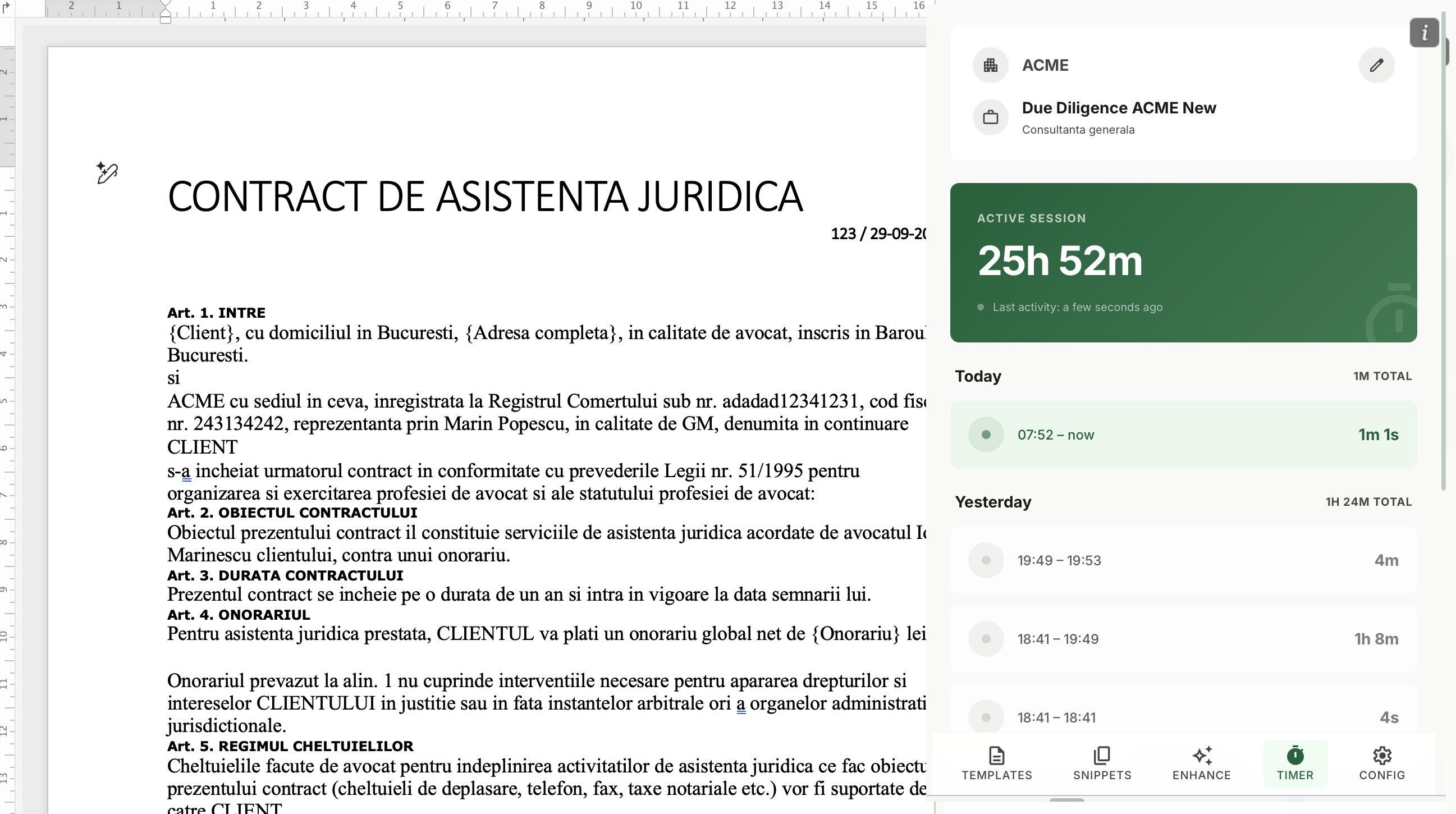
Generic Time Tracking vs. Document-Level Tracking
To understand why document-level tracking is transformative, consider the difference between the two approaches.
Generic time tracking works like this: a lawyer starts a timer for “Client: Smith - Contract Review.” Over the next two hours, they review a contract, draft a memo, respond to three emails, update a spreadsheet, and take a phone call. At the end, they log two hours to the Smith matter. But the actual breakdown is unknown. The client gets a two-hour line item with a vague description, and the firm has no data on how long each document actually took.
Document-level time tracking works differently: the timer starts when the lawyer opens a specific document in Word, runs while they work on it, pauses when they switch to another document, and stops when they close it. At the end of the day, the lawyer has a precise log showing 38 minutes on the contract review, 22 minutes on the engagement letter revision, and 14 minutes on the discovery memo. Each entry is attached to a specific document with an accurate duration.
The difference in billing accuracy, client transparency, and operational insight is substantial.
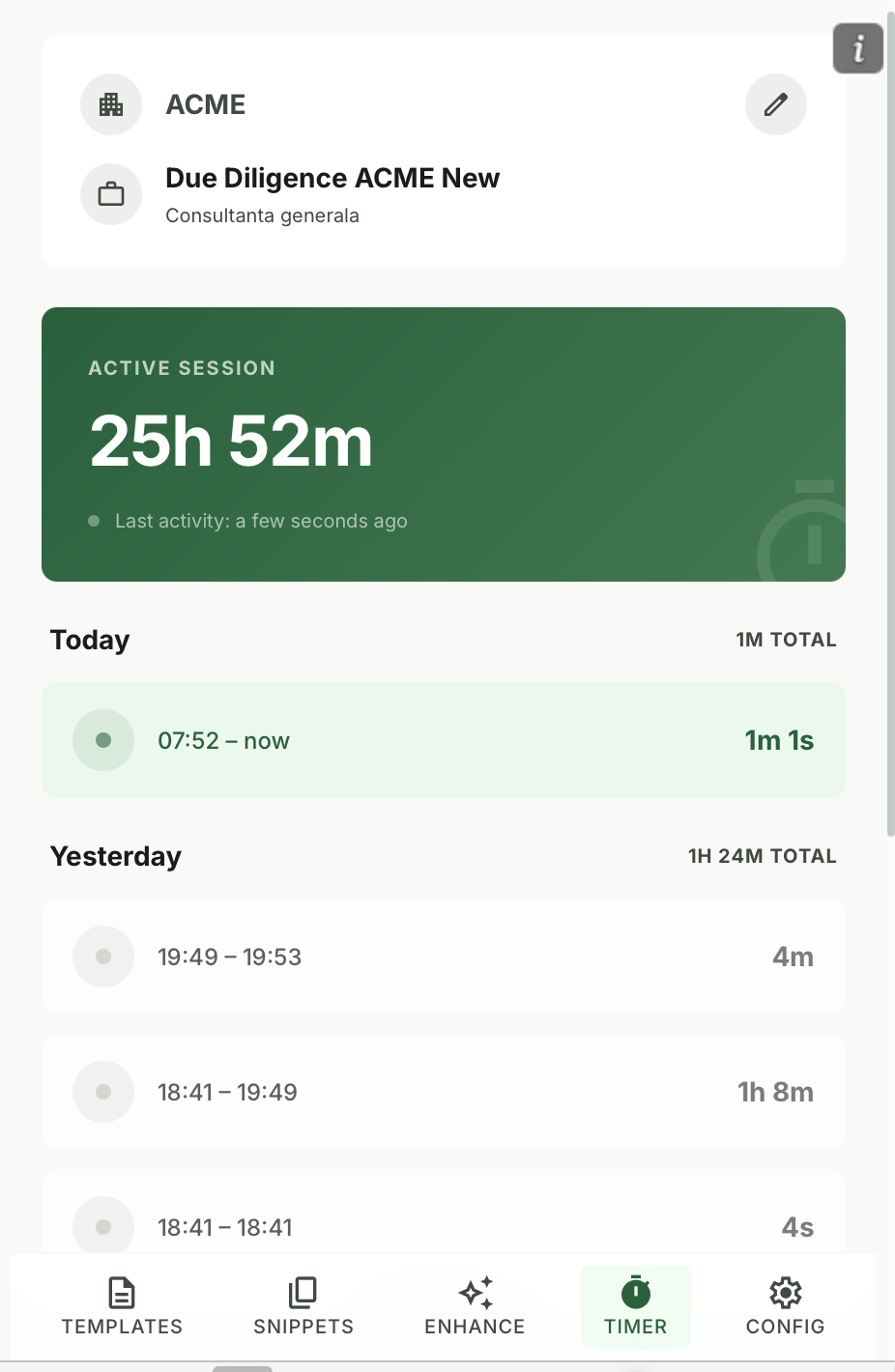
How Document-Level Time Tracking Works in Practice
Let us walk through a practical example of how document-level tracking transforms a typical workday for a lawyer.
8:30 AM - The attorney opens a draft motion in Word. The timer starts automatically. They spend 42 minutes drafting and formatting the document. When they close the file, the timer logs 42 minutes against that specific motion.
9:15 AM - They open a client engagement letter for a new matter. The timer tracks 18 minutes of edits before they switch to email.
9:45 AM - Back to Word, they open a discovery response template and spend 35 minutes customizing it for the case. Again, the time is captured precisely.
10:20 AM - A quick revision to the morning’s motion takes 12 minutes, logged as a separate entry against the same document.
End of day - The attorney’s time log shows every document they worked on, how long each session lasted, and the total time per document. Billing entries practically write themselves.
Compare this to the alternative: trying to reconstruct an eight-hour day from memory at 6 PM, guessing how long each task took, and inevitably under-billing or padding estimates. Professionals who track time from memory at the end of the day often lose a meaningful share of their billable hours to inaccurate recall.
5 Benefits of Document-Level Time Tracking
1. Precise Client Billing
Clients increasingly demand transparency in billing. A line item that reads “Contract drafting - 2.5 hours” is far more credible and defensible than “Legal work - 5 hours.” Document-level tracking provides the specificity that builds client trust and reduces billing disputes. For firms that face regular bill audits, detailed time records are invaluable.
2. Productivity Analysis by Document Type
When you know how long each document type takes, you gain insights that aggregate tracking cannot provide. You might discover that your team spends an average of 90 minutes on standard NDAs but only 30 minutes on engagement letters. That data informs decisions about which documents to prioritize for template automation and where training might improve efficiency.
3. Accurate Future Project Estimates
One of the hardest questions in professional services is “How long will this take?” Without document-level data, estimates are based on gut feeling. With it, you can say with confidence that a standard service agreement takes an average of 1.2 hours to draft, review, and finalize. This accuracy improves project scoping, client communication, and resource planning.
4. Individual and Team Accountability
Document-level tracking creates a factual record of how time is spent. This is not about surveillance; it is about accountability and self-awareness. Professionals gain visibility into their own working patterns. Managers can identify team members who might need support, additional training, or a redistribution of workload. The data supports constructive conversations grounded in facts rather than perceptions.
5. Comprehensive Reporting
Aggregate document-level data into reports by client, matter, document type, team member, or time period. These reports support billing, performance reviews, workload planning, and operational improvement. The reporting becomes richer and more actionable because the underlying data is granular and accurate.
Manual Toggling vs. Integrated Word Time Tracking
Not all time tracking implementations are equal. The method of tracking significantly affects adoption, accuracy, and usefulness.
Manual Toggle Tracking (Standalone Timer Apps)
With standalone time tracking apps, the professional must manually start and stop timers, switch between tasks, and label each time entry. This approach has several drawbacks:
- Friction: Every context switch requires manual action, which interrupts focus
- Forgetting: Professionals frequently forget to start or stop timers, leading to gaps
- Inaccuracy: Labels are applied retrospectively and may not accurately reflect the work done
- Disconnection: The timer lives in a separate application from the work itself, creating a fragmented workflow
- Low adoption: The more steps required, the less likely professionals are to track consistently
Integrated Word Time Tracking (Koala Docs Approach)
When the timer lives inside the document tool itself, the experience changes fundamentally:
- Zero friction: The timer is visible in the Word sidebar and starts with a single click
- Context awareness: The timer is associated with the specific document, so every second is attributed correctly
- Automatic labeling: The document name becomes the time entry label, eliminating manual data entry
- No app switching: Everything happens inside Word, maintaining focus on the work
- Higher adoption: Because tracking requires minimal effort, professionals actually do it
The difference in adoption rates between standalone timers and integrated tracking is significant. Organizations that implement integrated document-level tracking report higher adoption rates compared to standalone tools.
Use Case: Consultant Tracking Time on Proposals, Contracts, and Reports
Consider a management consultant who works across multiple client engagements simultaneously. In a typical week, they might produce:
- Two client proposals (5 hours each)
- Three progress reports (2 hours each)
- One project plan (3 hours)
- Five client emails converted to formal memos (30 minutes each)
- Two contract amendments (1 hour each)
That is 23.5 hours of document work across multiple clients. Without document-level tracking, the consultant must reconstruct this breakdown from memory or calendar entries. With integrated tracking, every minute is captured automatically as part of the normal workflow.
The result: billing entries are accurate to the minute, clients receive detailed breakdowns, and the consultant can analyze their time allocation to improve productivity. They might discover that proposals take longer than expected, suggesting a need for better proposal templates. Or they might find that a particular client’s reports consume disproportionate time, justifying a rate adjustment or process change.
Daily Totals and Historical Analysis
Document-level tracking is most powerful when the data is aggregated into meaningful views. Here is what professionals can see when they use Koala Docs time tracking:
Daily Summary A complete list of every document worked on during the day, with individual session times and daily totals. This makes end-of-day billing reconciliation effortless.
Weekly and Monthly Totals Aggregated views showing total hours by client, matter, or document type. These support invoicing, capacity planning, and utilization reporting.
Document History A timeline showing every session spent on a specific document, from initial creation to final revision. This is invaluable for project retrospectives and for answering the client question: “Why did this document take so long?”
Trend Analysis Over time, the data reveals patterns. Which days are most productive? Which document types are getting faster as templates improve? Where are the bottlenecks? This level of insight is simply not available from generic task-level tracking.
How the Koala Docs Timer Works Inside Word
Koala Docs includes a purpose-built time tracking feature that operates directly from the Word sidebar. Here is how it works in practice:
Starting the Timer Open any document in Word and click the timer button in the Koala Docs sidebar. The timer begins, and the document name is automatically recorded as the entry label.
Working Naturally Continue working on your document as you normally would. The timer runs in the background without affecting performance or interrupting your workflow. It is visible in the sidebar so you always know how long you have been working.
Pausing and Resuming Need to step away or switch to a different task? Pause the timer with one click. Resume when you return. Multiple sessions on the same document are tracked individually and totaled automatically.
Reviewing Your Time At any point, open the time tracking panel to see your daily entries, totals, and history. The data is organized by document, making it easy to prepare billing entries or time reports.
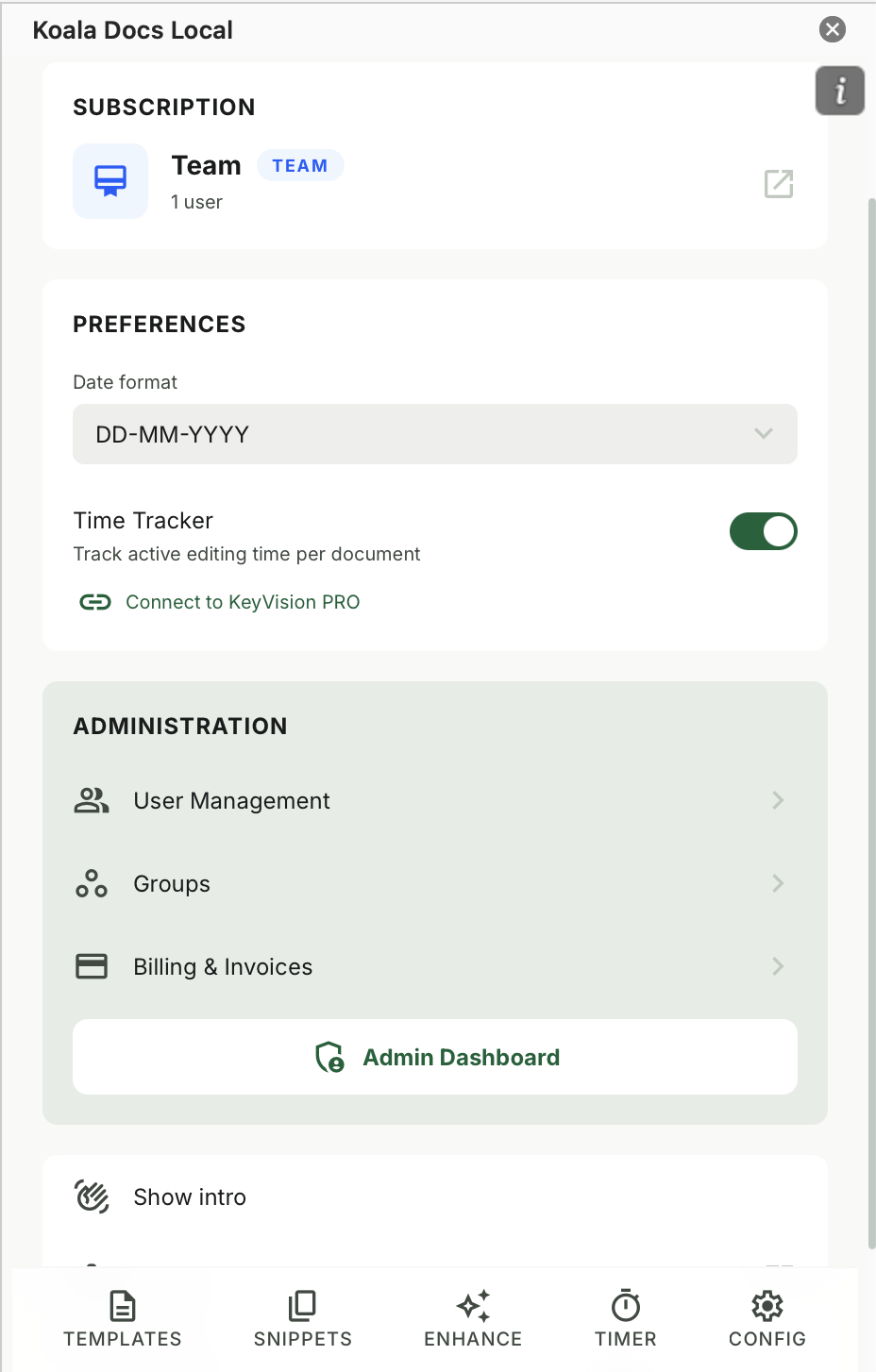
Exporting Data Export your time records for integration with billing systems, invoicing tools, or practice management software. The export includes document names, session times, totals, and dates.
The entire feature is designed with one principle: tracking time should require less effort than not tracking it. When the timer is right there in your document workflow, using it becomes the path of least resistance.
Time Tracking as Part of a Complete Document Workflow
Time tracking is most valuable when it operates as part of a broader document productivity system. When you combine tracking with templates, snippets, SMART documents, and AI translation, you create a complete workflow where every aspect of document creation is optimized and measured.
The ROI of document automation becomes measurable when you have time tracking data. You can quantify exactly how many minutes a template saves compared to manual creation. You can demonstrate to clients that their documents are produced efficiently. And you can make data-driven decisions about where to invest in further automation.
At from EUR 9.95 per month, Koala Docs provides templates, snippets, SMART documents, AI translation, and time tracking in a single integrated package. For professionals who bill by the hour, the time tracking feature alone can pay for the subscription many times over by capturing billable minutes that would otherwise be lost.
Frequently Asked Questions
How much billable time do professionals typically lose without proper tracking?
Professionals who rely on end-of-day time reconstruction often lose a meaningful share of their billable hours. For an attorney billing 1,800 hours per year at EUR 200 per hour, even a modest percentage of lost hours translates to significant annual lost revenue, and the losses compound across a team. Document-level tracking that captures time as it happens virtually eliminates these losses.
Is document-level time tracking suitable for non-legal professionals?
Absolutely. While the legal industry has the most obvious need due to hourly billing models, document-level time tracking benefits any professional who creates documents as part of their billable work. Consultants, accountants, architects, engineers, marketing agencies, and freelancers all produce documents that represent billable effort. Even professionals who do not bill by the hour benefit from understanding how their time is distributed across document types and clients, as this data informs pricing, resource allocation, and productivity improvement.
Can I integrate Koala Docs time tracking with my existing billing software?
Koala Docs time tracking data can be exported in standard formats that are compatible with most billing and practice management systems. The export includes document names, dates, session durations, and totals, giving you the raw data needed for invoice preparation. For many professionals, the Koala Docs daily summary is sufficient for direct billing without additional software, while larger firms can feed the data into their existing billing workflow.
Ready to capture every billable minute? Start with Koala Docs and add document-level time tracking to your Word workflow today. Combined with templates, snippets, SMART automation, and AI translation, Koala Docs gives you a complete productivity platform inside Microsoft Word. Explore features | View pricing | See use cases
Ready to automate your documents?
Try Koala Docs free — install in under 60 seconds.
Get Started Free →